* Connection Pool, DAO, DTO, Model 1 (개발 방식) 의 개념과 실습
Connection Pool
■ JDBC 프로그램은 Connection 자원을 획득하는데 많은 시간이 소요된다.
■ Connection Pool은 미리 DB와 연결을 유지하고 있는 Connection객체를 생성해서
Vector와 같은 타입의 객체에 넣어두고, 필요할 때 꺼내서 사용하고, 사용을 마친
Connection 객체는 다시 Pool로 반납하는 구조다.
[context.xml을 읽어와서 InitContext JNDI 의 lookup(java:comp/env/jdbc/myora) 메서드로 호출
Context
Resource
DataSource[jdbc/myora] ->인증 후 Connection
* include , useBean Action
<HTML5>
Head / Main / Footer 분리 =>
<div> : 레이아웃 만들 때 사용하는 태그.
환경설정
1. 톰캣에 ojdbc6.jar 파일을 lib에 복붙하기

2. 오라클 DB 접속 계정 생성 및 권한 주기

3. 오라클 디벨로퍼에서 새 접속 만들기
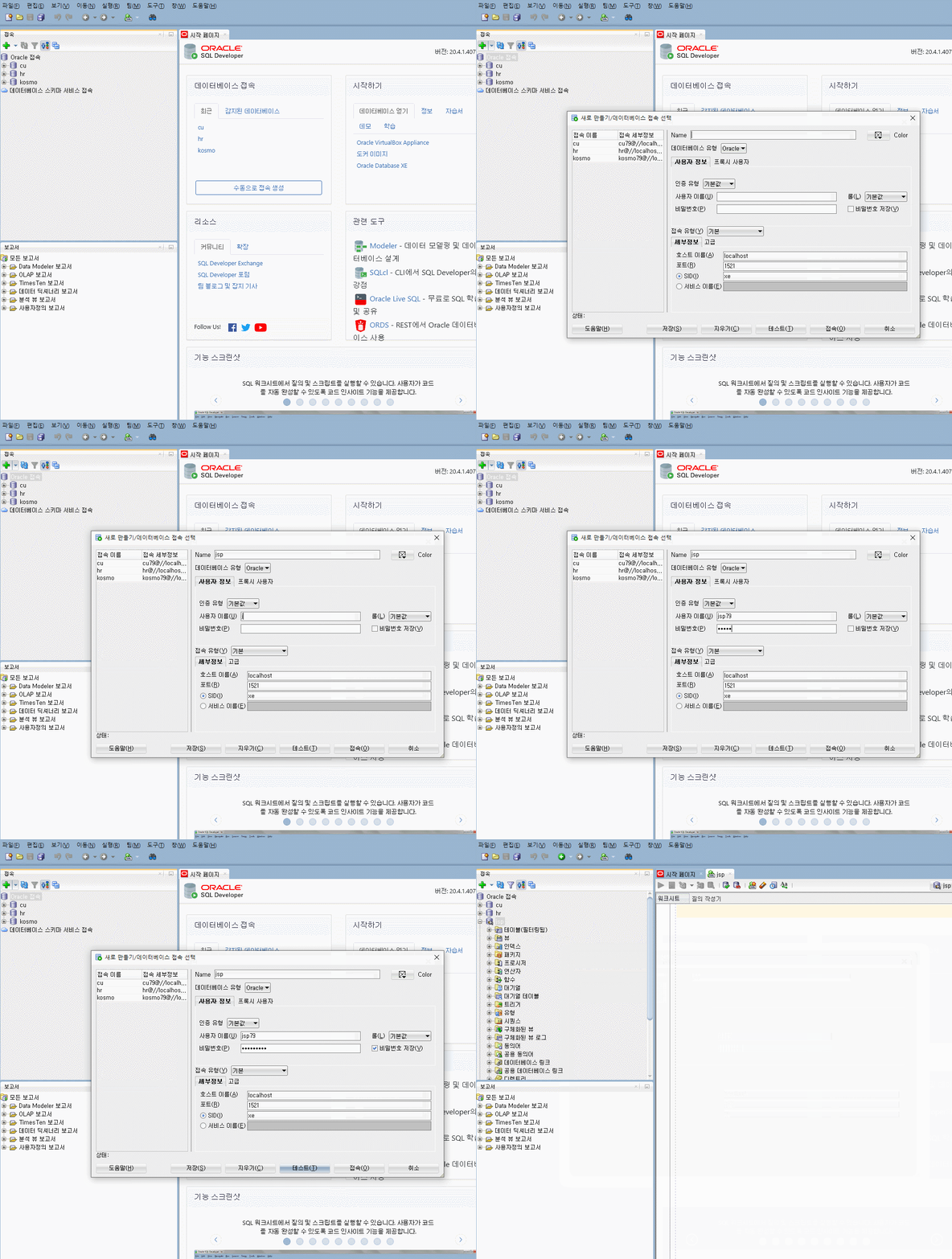
4. context.xml 작성
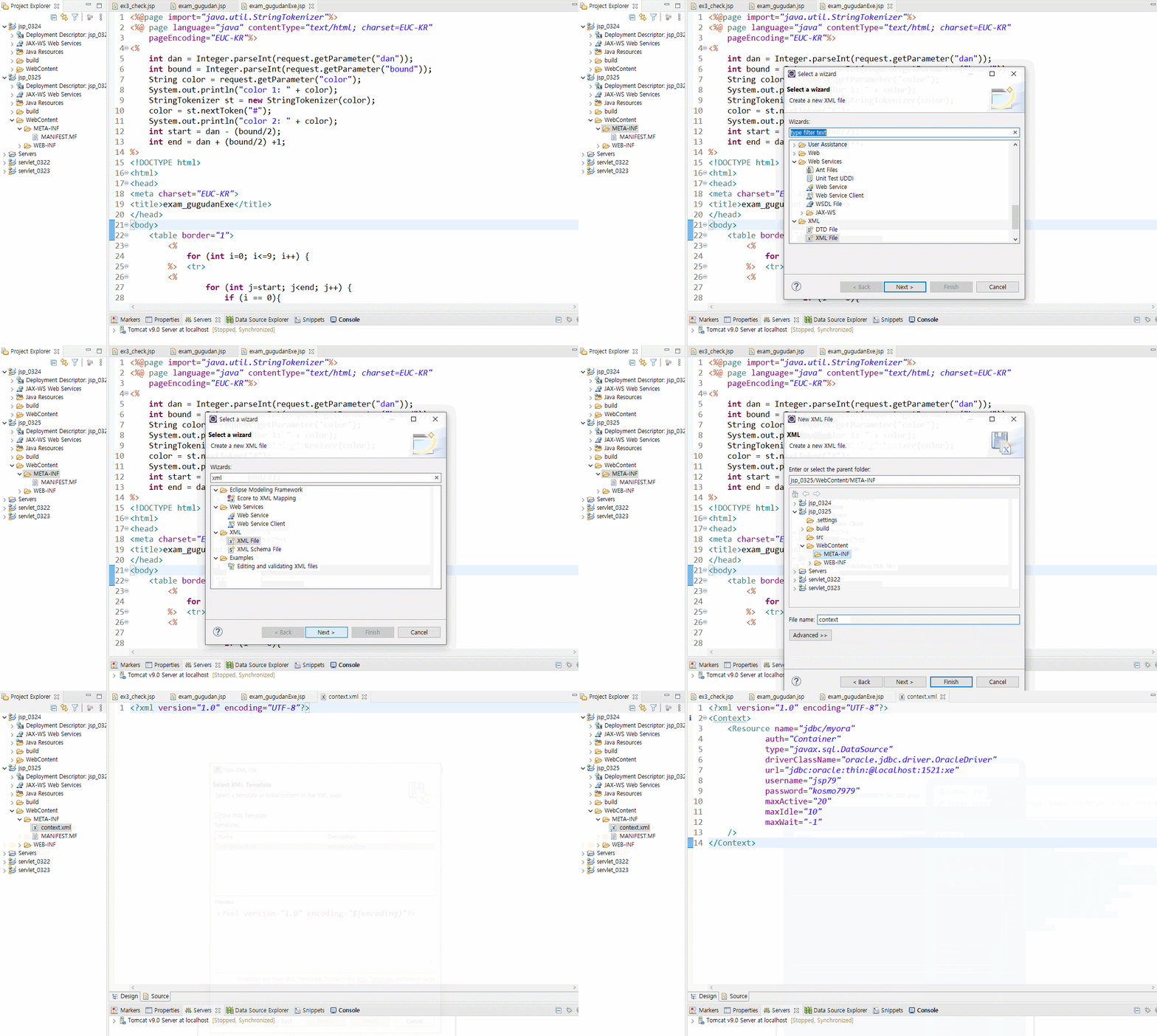
5. Myconn.java
package jsp_0325;

import java.sql.Connection;
import java.sql.SQLException;

import javax.naming.InitialContext;
import javax.naming.NamingException;
import javax.sql.DataSource;

public class MyConn {
	// context.xml에 작성한 Context를 읽어와서
	// DataSource 객체를 획득해서 Connection을
	// 반환하는 메서드를 정의하는 것이 목적
	private static DataSource ds;
	static {
		// context.xml에 Resource 객체를 통해서
		// DataSourcefmf 읽어들이기 위한 객체
		try {
			InitialContext ctx = new InitialContext(); // Ctrl + 1 : try-catch
			ds = (DataSource) ctx.lookup("java:comp/env/jdbc/myora");
		} catch (NamingException e) {
			e.printStackTrace();
		}
	}
	public static Connection getDs() throws SQLException {
		return ds.getConnection();
	}
}
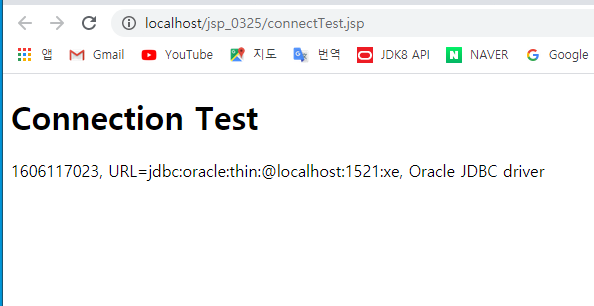
6. ConnectionTest.jsp
<%@page import="jsp_0325.MyConn"%>
<%@page import="java.sql.Connection"%>
<%@ page language="java" contentType="text/html; charset=EUC-KR"
    pageEncoding="EUC-KR"%>
<!DOCTYPE html>
<html>
<head>
<meta charset="EUC-KR">
<title>ConnectionTest.jsp</title>
</head>
<body>
<%
	Connection con = MyConn.getDs();
%>
	<h1>Connection Test</h1>
	<p> <%=con %> </p>
<%
	con.close();
%>
</body>
</html>
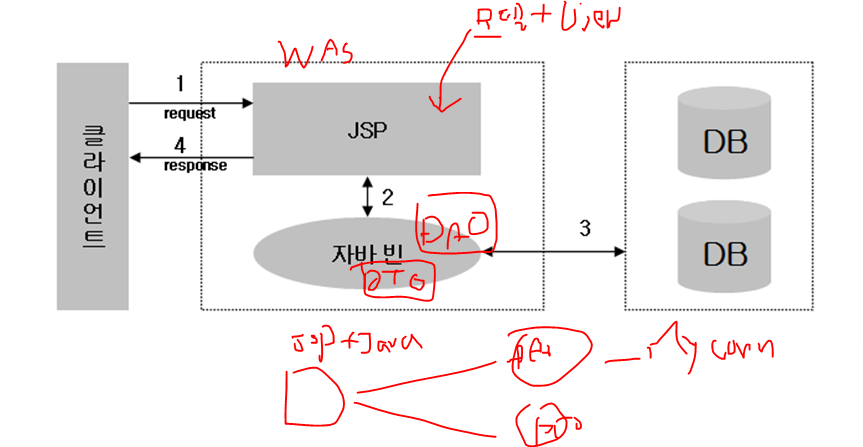
∎ Model1방식의 웹 개발 방식
디자인코드(HTML)와 자바코드(비즈니스 로직)를 구분하지 않고 하나의 jsp
파일 내에 함께 기술해서 웹 프로그램을 제작하는 방식이다.
장점 : 개발하기 쉽고, 배우기 쉽다.
단점 : 디자인코드와 비즈니스로직의 구분이 명확하지 않아 복잡도가 높다.
수정사항이 발생했을 때마다 디자이너와 개발자의 협업이 필요하다.
비즈니스 로직의 재사용성이 떨어진다.
유지보수하기 어렵다.
1. board 테이블 만들기
create table board (
no number constraint board_no_pk primary key,
title varchar2(100),
writer varchar2(50),
content varchar2(400),
pwd varchar2(10),
hit number(5),
regdate date);

create sequence board_seq
increment by 1
start with 1;
2. boardVO 클래스 만들기
package vo;

public class BoardVO {
	private int no;
	private String title;
	private String writer;
	private String content;
	private String pwd;
	private int hit;
	private String regdate;

	public int getNo() {
		return no;
	}
	public void setNo(int no) {
		this.no = no;
	}
	public String getTitle() {
		return title;
	}
	public void setTitle(String title) {
		this.title = title;
	}
	public String getWriter() {
		return writer;
	}
	public void setWriter(String writer) {
		this.writer = writer;
	}
	public String getContent() {
		return content;
	}
	public void setContent(String content) {
		this.content = content;
	}
	public String getPwd() {
		return pwd;
	}
	public void setPwd(String pwd) {
		this.pwd = pwd;
	}
	public int getHit() {
		return hit;
	}
	public void setHit(int hit) {
		this.hit = hit;
	}
	public String getRegdate() {
		return regdate;
	}
	public void setRegdate(String regdate) {
		this.regdate = regdate;
	}
}
3. boardDao 클래스 만들기
package dao;

import java.sql.Connection;
import java.sql.PreparedStatement;
import java.sql.ResultSet;
import java.sql.SQLException;
import java.util.ArrayList;

import conn.MyConn;
import vo.BoardVO;

public class BoardDao {
	private static BoardDao dao;

	public BoardDao() {
	}

	// Thread에 의해서 호출이 되기 때문에
	// Thread의 성질 때문에 동기화란 개념
	// synchronized 동기화 설정
	// lock pool에서 현재 getDao() 메서드가 호출되어
	// Thread가 안전하게 끝날 때 까지 보장을 받는다.
	public synchronized static BoardDao getDao() {
		if (dao == null)
			dao = new BoardDao();
		return dao;
	}

	// 게시물 추가
	public void insert(BoardVO vo) {
		StringBuffer sql = new StringBuffer();
		sql.append("insert into board ");
		sql.append("values(board_seq.nextVal, ?, ?, ?, ?, 0, sysdate)");
		Connection con = null;
		PreparedStatement pstmt = null;
		try {
			con = MyConn.getDs();
			pstmt = con.prepareStatement(sql.toString());
			pstmt.setString(1, vo.getTitle());
			pstmt.setString(2, vo.getWriter());
			pstmt.setString(3, vo.getContent());
			pstmt.setString(4, vo.getPwd());
			pstmt.executeUpdate();
		} catch (SQLException e) {
			e.printStackTrace();
		} finally {
			autoCloseObj(con, pstmt);
		}
	}
	// 게시물 조회
	public ArrayList<BoardVO> list(){
		ArrayList<BoardVO> arBoard = new ArrayList<BoardVO>();
		StringBuffer sql = new StringBuffer();
		sql.append("select no, title, writer, content, hit, regdate from board order by 1 desc");
		Connection con = null;
		PreparedStatement pstmt = null;
		ResultSet rs = null;
		try {
			con = MyConn.getDs();
			pstmt = con.prepareStatement(sql.toString());
			rs = pstmt.executeQuery();
			while (rs.next()) {
				BoardVO vo = new BoardVO();
				vo.setNo(rs.getInt("no"));
				vo.setTitle(rs.getString("title"));
				vo.setWriter(rs.getString("writer"));
				vo.setContent(rs.getString("content"));
				vo.setHit(rs.getInt("hit"));
				vo.setRegdate(rs.getString("regdate"));
				arBoard.add(vo);
			}
		} catch (SQLException e) {
			e.printStackTrace();
		} finally {
			autoCloseObj(con, pstmt, rs);
		}
		return arBoard;
	}

	//조회수 증가 : update board set hit = hit + 1 where no=?
	public void hit(int no){
		String sql = "update board set hit = hit + 1 where no=?";
		Connection con = null;
		PreparedStatement pstmt = null;
		try {
			con = MyConn.getDs();
			pstmt = con.prepareStatement(sql);
			pstmt.setInt(1, no);
			pstmt.executeUpdate();
		} catch (SQLException e) {
			e.printStackTrace();
		} finally {
			autoCloseObj(con, pstmt);
		}
	}

	//상세정보 조회
	public BoardVO info(int no){
		BoardVO vo = new BoardVO();
		String sql = "select no, title, writer, content, hit, regdate from board where no=?";
		Connection con = null;
		PreparedStatement pstmt = null;
		ResultSet rs = null;
		try {
			con = MyConn.getDs();
			pstmt = con.prepareStatement(sql);
			pstmt.setInt(1, no);
			rs = pstmt.executeQuery();
			if(rs.next()) {
				vo.setNo(rs.getInt("no"));
				vo.setTitle(rs.getString("title"));
				vo.setWriter(rs.getString("writer"));
				vo.setContent(rs.getString("content"));
				vo.setHit(rs.getInt("hit"));
				vo.setRegdate(rs.getString("regdate"));
			}
		} catch (SQLException e) {
			e.printStackTrace();
		} finally {
			autoCloseObj(con, pstmt, rs);
		}
		return vo;
	}

	// 게시물 수정
	public void update(BoardVO vo){
		String sql = "update board set title=?, content=? where no=? and pwd=?";
		Connection con = null;
		PreparedStatement pstmt = null;
		try {
			con = MyConn.getDs();
			pstmt = con.prepareStatement(sql);
			pstmt.setString(1, vo.getTitle());
			pstmt.setString(2, vo.getContent());
			pstmt.setInt(3, vo.getNo());
			pstmt.setString(4, vo.getPwd());
			pstmt.executeUpdate();
		} catch (SQLException e) {
			e.printStackTrace();
		} finally {
			autoCloseObj(con, pstmt);
		}
	}

	//게시물 삭제
	public void delete(int no){
		String sql = "delete board where no=?";
		Connection con = null;
		PreparedStatement pstmt = null;
		try {
			con = MyConn.getDs();
			pstmt = con.prepareStatement(sql);
			pstmt.setInt(1, no);
			pstmt.executeUpdate();
		} catch (SQLException e) {
			e.printStackTrace();
		} finally {
			autoCloseObj(con, pstmt);
		}
	}

	public void autoCloseObj(Connection con, PreparedStatement pstmt) {
		try {if (pstmt != null)pstmt.close();} catch (SQLException e) {e.printStackTrace();}
		try {if (con != null)con.close();} catch (SQLException e) {e.printStackTrace();}
	}
	public void autoCloseObj(Connection con, PreparedStatement pstmt, ResultSet rs) {
		try {if (pstmt != null)pstmt.close();} catch (SQLException e) {e.printStackTrace();}
		try {if (con != null)con.close();} catch (SQLException e) {e.printStackTrace();}
		try {if (rs != null)rs.close();} catch (SQLException e) {e.printStackTrace();}
	}
}
4. boardTest.jsp 만들기
<%@page import="java.util.ArrayList"%>
<%@page import="vo.BoardVO"%>
<%@page import="dao.BoardDao"%>
<%@ page language="java" contentType="text/html; charset=EUC-KR"
pageEncoding="EUC-KR"%>
<% // boardTest.jsp
//입력 , 출력, 수정, 삭제 테스트 하기
BoardDao dao = BoardDao.getDao();
BoardVO vo = new BoardVO();
vo.setWriter("이진아");
vo.setTitle("곧 점심시간입니다.");
vo.setContent("성공 했습니다.");
vo.setPwd("22");
dao.insert(vo);		// 게시물 추가
%> <h1> 게시물 리스트 </h1> <%
ArrayList<BoardVO> list = dao.list();	// 게시물 리스트 출력
	for(BoardVO e : list) {
	%>
	<%=e.getNo()%>
	<%=e.getWriter()%>
	<%=e.getTitle()%>
	<%=e.getContent()%>
	<%=e.getRegdate()%>
	<%
	}%><br><br><%
	BoardVO vo1 = dao.info(15);		// 게시물 상세 정보
%><h1> 게시물 상세정보 </h1>
<%=vo1.getTitle()%>
<%=vo1.getWriter()%>
<%=vo1.getContent()%><br><br>
<%
BoardVO vo2 = new BoardVO();
vo2.setTitle("제목 수정");
vo2.setContent("내용 수정 성공 했습니다.");
vo2.setPwd("22");
vo2.setNo(15);
dao.update(vo2);		// 게시물 수정

BoardVO vo3 = dao.info(15);		// 게시물 상세 정보
%><h1> 게시물 수정 후 게시물 정보 </h1>
<%=vo3.getTitle()%>
<%=vo3.getWriter()%>
<%=vo3.getContent()%><br><br>
<%
dao.delete(15);	// 게시물 삭제
%><h1> 게시물 삭제 후 리스트 </h1><%
ArrayList<BoardVO> list1 = dao.list();	// 게시물 리스트 출력
	for(BoardVO e : list1) {
	%>
	<%=e.getNo()%>
	<%=e.getWriter()%>
	<%=e.getTitle()%>
	<%=e.getContent()%>
	<%=e.getRegdate()%><br>
	<%
	}
	%>
게시판 만들기

1. writer.jsp 만들기
<%@ page language="java" contentType="text/html; charset=EUC-KR"
    pageEncoding="EUC-KR"%>
<!DOCTYPE html>
<html>
<head>
<meta charset="EUC-KR">
<title>write.jsp</title>
<style>
	#cont { margin: auto; width: 450px; }
</style>
</head>
<body>
<div id="cont">
<form method="post" action="insert.jsp">
	<table border="1">
<tr>
	<th colspan="2"> 게시물 작성하기</th>
</tr>
<tr>
	<td>제목</td>
	<td><input type="text" name="title" id="title"></td>
</tr>
<tr>
	<td>작성자</td>
	<td><input type="text" name="writer" id="writer"></td>
</tr>
<tr>
	<td>내용</td>
	<td><textarea name="content" id="content"></textarea></td>
</tr>
<tr>
	<td>비밀번호</td>
	<td><input type="password" name="pwd" id="pwd"></td>
</tr>
<tr>
	<th colspan="2"><input type="submit" value="등록">
	<input type="reset" value="취소"></th>
</tr>
</table>

</form>
</div>
</body>
</html>
2. insert.jsp 만들기
<%@page import="vo.BoardVO"%>
<%@page import="dao.BoardDao"%>
<%@ page language="java" contentType="text/html; charset=EUC-KR"
    pageEncoding="EUC-KR"%>
<%
	request.setCharacterEncoding("euc-kr");
	// 파라미터를 받아서 vo에 저장한 후 Dao에 전달하기
	// title, writer, content, pwd
%>
<!-- JSP 액션 태그 : 현재는 거의 사용되지 않는다. -->
<jsp:useBean id="vo" class="vo.BoardVO"/>
<jsp:setProperty property="*" name="vo"/>
<%--
	BoardDao dao = new BoardDao();
	BoardVO vo = new BoardVO();
	vo.setTitle(request.getParameter("title"));
	vo.setWriter(request.getParameter("writer"));
	vo.setContent(request.getParameter("content"));
	vo.setPwd(request.getParameter("pwd"));
	dao.insert(vo);
--%>
<%
	BoardDao dao = new BoardDao();
	dao.insert(vo);
	// 이동 방식
	response.sendRedirect("list.jsp");
%>
3. list.jsp 만들기
<%@page import="dao.BoardDao"%>
<%@page import="vo.BoardVO"%>
<%@page import="java.util.ArrayList"%>
<%@ page language="java" contentType="text/html; charset=EUC-KR"
    pageEncoding="EUC-KR"%>
<%
	ArrayList<BoardVO> list = BoardDao.getDao().list();
%>
<!DOCTYPE html>
<html>
<head>
<meta charset="EUC-KR">
<title>list.jsp</title>
<style>
	#cont { margin: auto; width: 550px; }
	table, td, th {
	  border: 1px solid black;
	}

	table {
	  width: 100%;
	  border-collapse: collapse;
	}
</style>
</head>
<body>
<div id="cont">
 <table border="1">
 <tr>
	<th colspan="5">게시물 목록</th>
 </tr>
 <tr>
	<td>번호</td>
	<td>제목</td>
	<td>작성자</td>
	<td>조회수</td>
	<td>등록일</td>
 </tr>
 <!-- 데이터 반복 시작 -->
 <% for (BoardVO e : list) { %>
 <tr>
	<td><%=e.getNo()%></td>
	<td><%=e.getTitle()%></td>
	<td><%=e.getWriter()%></td>
	<td><%=e.getHit()%></td>
	<td><%=e.getRegdate()%></td>
 </tr>
 <% } %>
  <!-- 데이터 반복 끝 -->
 <tr>
	<th colspan="5">
	<input type="button" value="새 글쓰기" onclick="">
	</th>
 </tr>
 </table>
</div>
</body>
</html>
4. info.jsp 만들기
<%@page import="dao.BoardDao"%>
<%@page import="vo.BoardVO"%>
<%@ page language="java" contentType="text/html; charset=EUC-KR"
    pageEncoding="EUC-KR"%>
<%
	// list.jsp에서 선택한 링크를 통해서 get방식으로 전송 되어온 파라미터 값
	// no
	int no = Integer.parseInt(request.getParameter("no"));
	BoardVO vo = BoardDao.getDao().info(no);
%>
<!DOCTYPE html>
<html>
<head>
<meta charset="EUC-KR">
<title>info.jsp</title>
<style>
	#cont { margin: auto; width: 450px; }
	table {
	  text-align: center;
	}
</style>
</head>
<body>
<div id="cont">
	<table border="1">
<tr>
	<th colspan="2">게시물 상세보기</th>
</tr>
<tr>
	<td>번호</td>
	<td><input type="text" name="pwd" id="no"
			value="<%=no %>" readonly="readonly"></td>
</tr>
<tr>
	<td>제목</td>
	<td><input type="text" name="title" id="title"
			value="<%=vo.getTitle()%>" readonly="readonly"></td>
</tr>
<tr>
	<td>작성자</td>
	<td><input type="text" name="writer" id="writer"
			value="<%=vo.getWriter()%>" readonly="readonly"></td>
</tr>
<tr>
	<td>내용</td>
	<td><textarea name="content" id="content"><%=vo.getContent()%></textarea></td>
</tr>
<tr>
	<th colspan="2"><form action="list.jsp"><input type="submit" value="리스트">
	<input type="reset" value="취소"></form></th>
</tr>
</table>
</div>
</body>
</html>'WEB > Study' 카테고리의 다른 글
| [0401][JSP] 로그인 세션 , 파일 업로드 구현 하기 (0) | 2021.04.01 |
|---|---|
| [0326][Web-JSP] Model 1 방식으로 만드는 기본 CRUD (0) | 2021.03.26 |
| [0324] [Web - JSP] HTML5 : Form태그 요소, GET,POST , Parameter정리, JSP등 기본 문법 (0) | 2021.03.24 |
| [0323] [Web - JSP] HTML5, Servlet 생명주기 , Servlet에서 이동방식 (0) | 2021.03.23 |
| [0322] [Web - JSP] JSP 개발 환경 및 기초 문법 (0) | 2021.03.22 |